Monday, 8 March 2021

Calculate data size using Enum in Go

This method is learned from Youtube online course https://www.youtube.com/watch?v=YS4e4q9oBaU&t=5713s


I found it quite interesting and a nice demo to understand Enum in Go.

The code is like below:

package main

import (
"fmt"
)

const (
_ = iota //ignore first value by assigning to blank identifier
KB = 1 << (10 * iota)
MB
GB
TB
PB
ZB
YB
)

func main() {
fileSize := 4000000000.
fmt.Printf("%.2fGB", fileSize/GB)
}

Output:
3.73GB

Here constants KB, MB, GB, TB, PB, ZB and YB are used to calculate the responding size by dividing the constant value. Since they are written in upper case, which means they can be used in other packages as well. So it is a very useful tool.


Sunday, 7 March 2021

Variable scope in Go

There are only three levels of variable scope in Go: package level, globe level and block level.


Package Level:

Package level variables are accessible inside the package. They are defined directly on the package level and started with lower case. For example:

package main
import "fmt"

var counter int = 42

func main() {
    fmt.Println(counter);
}


Globe Level:

Globe level variables can be accessed outside of the package. Similar to package level variables, they are also defined directly on the package level, however they must be started in upper case. For example:

package main
import "fmt"

var Counter int = 42 //Here Counter is accessible outside of the package

func main() {
    fmt.Println(Counter);
}

Globe level variables can be accessed by other packages using packagename.VariableName after import the package.

Block Level:

Block level is like local variables in other programming languages. They are defined in a block like functions, if statement or else.

package main
import "fmt"

func main() {
    counter := 42
    fmt.Println(counter);

}


Tuesday, 5 January 2021

My Eclipse favorite configurations

 My Eclipse favorite configurations

Enable auto activation triggers for Java

Many times you are wondering how come any programmers can type so fast. Trust me, with auto recommendation feature in Eclipse, you can be fast as well. you just need a little bit of configurations.


Go to Preferences->Java->Editor->Content Assist

Copy "abcdefghijklmnopqrstuvwxyzABCDEFGHIJKLMNOPQRSTUVWXYZ." to the red circle box below (without the quotation mark).


You can tick "Disable insertion triggers except 'Enter'". I prefer to do that otherwise it will automatically add some recommended string to your variables. For example, I want to define a string variable "String name", it will automatically add "String" to my variable like "String nameString". I feel this very annoying, so I usually tick this checkbox.


Saturday, 20 June 2020

How to make your External IP address in Google Cloud accessible through internet

This simple post is to teach you how to make your External IP address in Google Cloud accessible through internet. Here I assume you have created a VM instance in Google Cloud.


1, Find your external IP address

Go to your console in Google Cloud Platform. Then go to Compute Engine-> VM  Instances, you will see your instance list. From there you can find the External IP address of each instance like below:


2, Create firewall rule to make your server port accessible

Click "Setup Firewall Rules" link like below to enter the Firewall rules.


Click "Create new Firewall Rule" link on the top, and fill the firewall rule form.
a) Create a rule name;

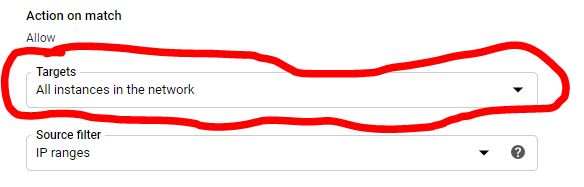
b) Change Targets to "All instances in the network";


c) Change Source IP ranges to "0.0.0.0/0". Here is important. You can use Source filter to filter the IP addresses you want to allow the access. If you want your website available to all networks, you need to enter "0.0.0.0/0";

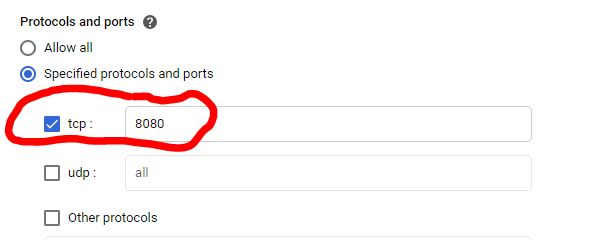
d) Specify the port number of your web server;

e) Click save;

3, Open browser and input the external IP address and server port number with URL link of your server, you should be able to see your web page.


Sunday, 2 February 2020

One-Time Pads


Why are One-Time Pads perfectly secure?

If the key is random, one-time pad is perfectly secret against ciphertext-only cryptanalysis(if the key is distributed reliably), even against brute force search.

So how can it beat brute force attack. Think about below example:

You have plain text: "Hello"
Your OTP key: 0x146EDC3425
Thus, your ciphered text: 0x5C0BB0584A

The attacker only knows ciphered text 0x5C0BB0584A in this scenario. From here he can try to decipher the message using brute force. But because the key is random, the deciphered text can be anything with equal possibility. So it can be "Think", "about", "Below", "force"... Anything meaningful words. So the attacker still cannot decide what is the true plain text, which the plain text set he gets from ciphered text is meaningless.


Thursday, 2 January 2020

Common useful SQL commands in MySQL

Safe Update Mode:

If Safe Update Mode is enabled in MySQL, then you may encounter an error "You are using safe update mode and you tried to update a table without a WHERE that uses a KEY column." when you use UPDATE or DELETE statements without a WHERE keyword (Sometimes my statements contain WHERE, but still got this error, does anyone know why?). When you see this error, you can solve it by turning off safe update mode. There are two ways to do so:
  1. You can put "SET SQL_SAFE_UPDATES=0;" in the beginning of your scripts;
  2. You can turn off safe update mode from workbench, by doing so, you don't need to put "SET SQL_SAFE_UPDATES=0;" in your scripts every time. Edit -> Preferences -> SQL Editor. Scroll down, you will find" Safe Updates(rejects UPDATEs and DELETEs with no restrictions)" checkbox. Uncheck the checkbox, you won't have the troubles anymore.


Delete table from database:

DELETE FROM Database.Table;


Find rows with duplicated keys:

SELECT
    Name,                                                     -- 
    COUNT(Name)                                      -- Here give the count of duplicate number
FROM
    Database.Table
GROUP BY Name                                     -- Group rows with HAVING condition
HAVING COUNT(Name) > 1;

Dump table from database:

mysqldump -u usernane -p password database_name table1 table2 table3 > tables.sql


Sunday, 15 December 2019

Basic understanding of TLS-PSK protocol

This post will talk about the basic understanding of TLS-PSK protocol. It will not cover TLS's history and how its mathematical algorithms work. Instead, what is TLS-PSK protocol and how it works will be discussed here. I prefer using diagrams to help explain things. Hopefully, it can give readers a very basic insights of TLS-PSK.

What is TLS-PSK

Before talking about what is TLS-PSK, I would like to introduce what is TLS first. TLS, Transport Layer Security, is a cryptographic protocol, aims to provide protection to end-to-end communication over the internet. It helps to protect network users from eavesdropping, tempering and so on.
Clear data transmission is dangerous, given that technical hacker can listen to the communication between two computers and steal sensitive data like user name, password and so on. This is situation where TLS can step in and protect you.

TLS has two steps: TLS handshake and data transmission. During TLS handshake, the communicating parties must agree on an session key and a cipher suite. This session key will be used to encrypt communication data until connection closes. But how to make sure the the two parties are using the same session key, or how to exchange the session key securely between them. There are many methods to do key exchange, TLS-PSK(Pre-Shared Key) is one of them. And it is a fast one, because it uses symmetric key algorithm and improve the performance. So it is usually used in embedded systems which usually have limited CPU power.

How does TLS-PSK work

TLS-PSK protocol uses symmetric keys as pre-shared key to exchange session keys. There are three cipher suites for TLS-PSK: symmetric key only authentication, DH key exchange authenticated with a pre-shared key and public key authentication. In this post, we will only talk about the symmetric key only PSK.

Before the handshake start, the session keys are already known by both communicating parties, because session key are derived from the pre-shared key, and pre-shared key is known by both. You may want to ask how pre-shared key is distributed. Well, there are many mechanisms used to share the pre-shared keys like GBA(Generic BootStrapping Architecture), which we will not talk about in this post. So since the session keys are already known before handshake, then why we still need to do handshake. Because we need to make sure the session keys to be used are the same, otherwise it will failed to do communication in application level. Besides, there are could be many keys stored in server, server needs to know which key to use. So usually during handshake, the client will send ClientKeyExchange request with PSK Identity to tell server which key to use.

Then how does TLS-PSK handshake works exactly, what are the steps. So in the following, I will use simplified diagrams to illustrate the TLS-PSK handshake process. Detail will not be discussed in each step. We can refer to RFC standard for the details.

1, Client sends a ClientHello message to server to initiate the communication;


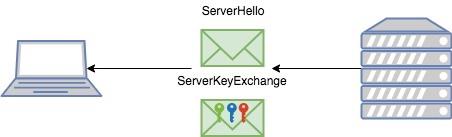
2, Server sends back a ServerHello message and ServerKeyExchange message. The ServerKeyExchange message will contain the session key hint, which helps to tell client what key labels server has; (Note,  represents a key label, not the actual session key, the actual key is )


3, After client confirms server has the same key label it wants to use. Then it will send a Finished message with ClientKeyExchange, which is encrypted by the session key with key label, and in the ClientKeyExchange message, it specifies which key label to use;


4, Server receives the Finished message, and get the key label from ClientKeyExchange, get the actual session key based on key label, then use session key to decrypt the finished message;

5, If decryption is successful, then send another finished message. On the client's side, it will repeat the same processor as step 4 since it knows which key to use;


6, If the decryption is passed too. Then the TLS-PSK handshake is done. Client and server can start to use the same session key to secure their communication on the application level.

Summary

So TLS-PSK is one of the TLS key exchange algorithms. It is simpler and faster compared to other asymmetric key exchange algorithms. You can find the details on RFC[4] standard.


(The elements in parenthesis are not included when the PSK key exchange algorithm is used. and "*" indicates a situation-dependent message that is not always sent [RFC 4])





Difference between "docker stop" and "docker kill"

 To stop a running container, you can use either "docker stop" or "docker kill" command to do so. Although it seems doin...